
概述
Apache Airflow 是一个开源工具,用于以编程方式编写、调度和监控数据管道。Airflow 可扩展的 Python 框架使您能够构建与几乎任何技术连接的工作流程。在使用 Airflow 时,监控 DAG 和任务运行状况以确保数据管道顺利运行至关重要。Airflow Provider 集成允许 Airflow 与 Keep 之间进行无缝通信,您可以通过 webhook 配置将任务失败等告警直接转发到 Keep。
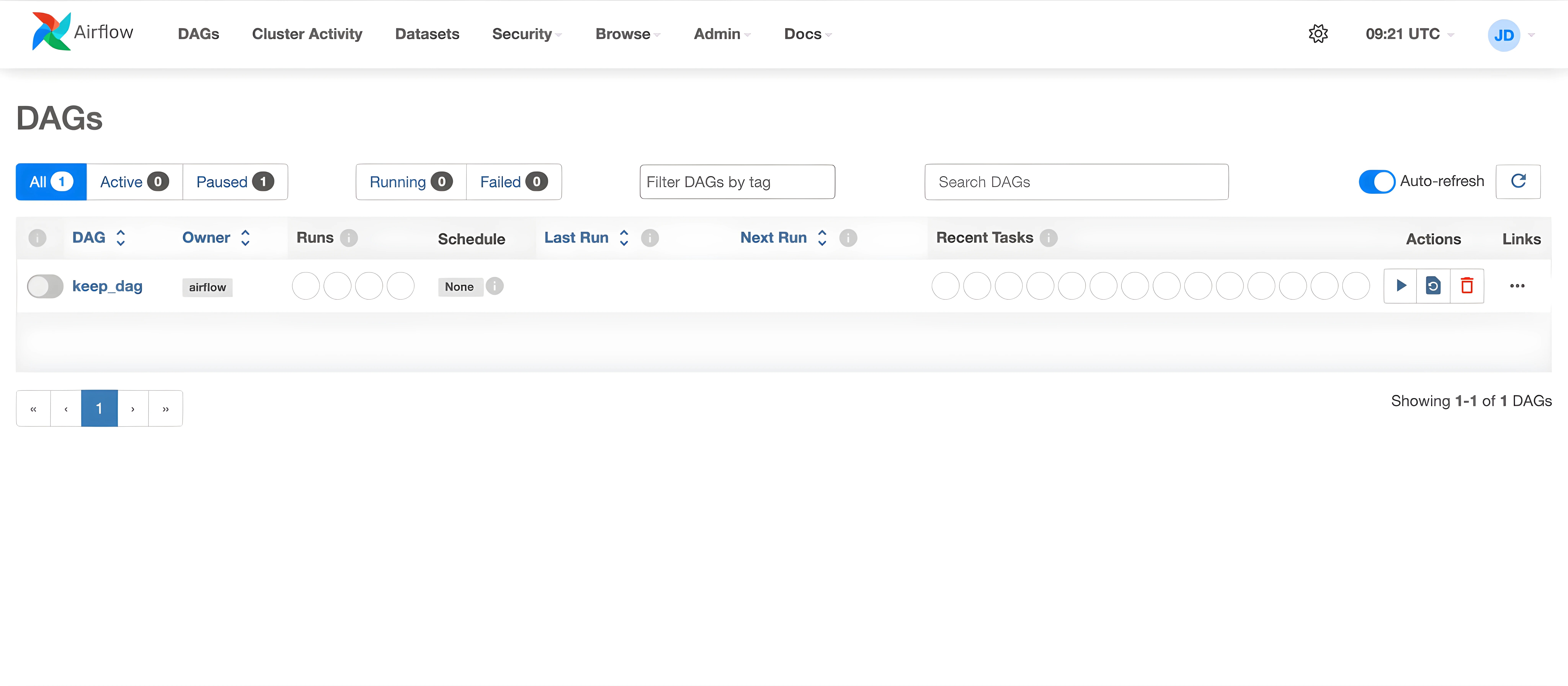
将 Airflow 连接到 Keep
通过 Webhook 进行告警集成
要将 Airflow 连接到 Keep,请配置 Airflow 使用 Keep 的 webhook 发送告警。您需要提供:
- Keep Webhook URL:Keep 提供的 webhook URL(例如
https://api.keephq.dev/alerts/event/airflow)。 - Keep API Key:Keep 平台上生成的 API 密钥,用于身份验证。
将 Airflow 与 Keep 集成的常用方法是通过 Airflow Callbacks 配置告警。例如,当 Airflow 任务失败时,回调可以通过 webhook 向 Keep 发送告警。
实现此功能有以下几个步骤:
步骤 1:定义 Keep 的告警信息
使用以下信息构建告警载荷:
python
data = {
    "name": "Airflow Task Failure",
    "description": "Task keep_task failed in DAG keep_dag",
    "status": "firing",
    "service": "pipeline",
    "severity": "critical",
}
步骤 2:配置 Keep 的 Webhook 凭据
要向 Keep 发送告警,请配置 webhook URL 和 API 密钥。以下是使用 Python 发送告警的示例:
注意:您需要使用 Keep API 密钥设置
KEEP_API_KEY环境变量。
python
import os
import requests

def send_alert_to_keep(dag_id, task_id, execution_date, error_message):
    # 如果您的 Keep webhook URL 不同,请替换。
    keep_webhook_url = "https://api.keephq.dev/alerts/event/airflow"
    api_key = os.getenv("KEEP_API_KEY")
    headers = {
        "Content-Type": "application/json",
        "Accept": "application/json",
        "X-API-KEY": api_key,
    }

    data = {
        "name": f"Airflow Task Failure: {task_id}",
        "message": f"Task {task_id} failed in DAG {dag_id} at {execution_date}",
        "status": "firing",
        "service": "pipeline",
        "severity": "critical",
        "description": str(error_message),
    }

    response = requests.post(keep_webhook_url, headers=headers, json=data)
    response.raise_for_status()
步骤 3:配置 Airflow 回调函数
现在,配置回调以便在任务失败时向 Keep 发送告警。您可以将此回调附加到 DAG 中的一个或多个任务,如下所示:
python
import os
import requests
from datetime import datetime
from datetime import timedelta

from airflow import DAG
from airflow.operators.bash_operator import BashOperator

default_args = {
    'owner': 'airflow',
    'depends_on_past': False,
    'email_on_failure': False,
    'email_on_retry': False,
    'retries': 1,
    'retry_delay': timedelta(minutes=5),
}

def send_alert_to_keep(dag_id, task_id, execution_date, error_message):
    # 如果您的 Keep webhook URL 不同,请替换。
    keep_webhook_url = "https://api.keephq.dev/alerts/event/airflow"
    api_key = os.getenv("KEEP_API_KEY")
    headers = {
        "Content-Type": "application/json",
        "Accept": "application/json",
        "X-API-KEY": api_key,
    }

    data = {
        "name": f"Airflow Task Failure: {task_id}",
        "message": f"Task {task_id} failed in DAG {dag_id} at {execution_date}",
        "status": "firing",
        "service": "pipeline",
        "severity": "critical",
        "description": str(error_message),
    }

    response = requests.post(keep_webhook_url, headers=headers, json=data)
    response.raise_for_status()

def task_failure_callback(context):
    send_alert_to_keep(
        dag_id=context["dag"].dag_id,
        task_id=context["task_instance"].task_id,
        execution_date=context["execution_date"],
        error_message=context.get("exception", "Unknown error"),
    )

dag = DAG(
    dag_id="keep_dag",
    default_args=default_args,
    description="A simple DAG with Keep integration",
    schedule_interval=None,
    start_date=datetime(2025, 1, 1),
    catchup=False,
)

task = BashOperator(
    task_id="keep_task",
    bash_command="exit 1",
    dag=dag,
    on_failure_callback=task_failure_callback,
)
步骤 4:在 Keep 中查看告警
设置上述配置后,Airflow 任务中的任何失败都会触发通过配置的 webhook 发送到 Keep 的告警。然后您可以使用 Keep 仪表板查看、管理和响应这些告警。
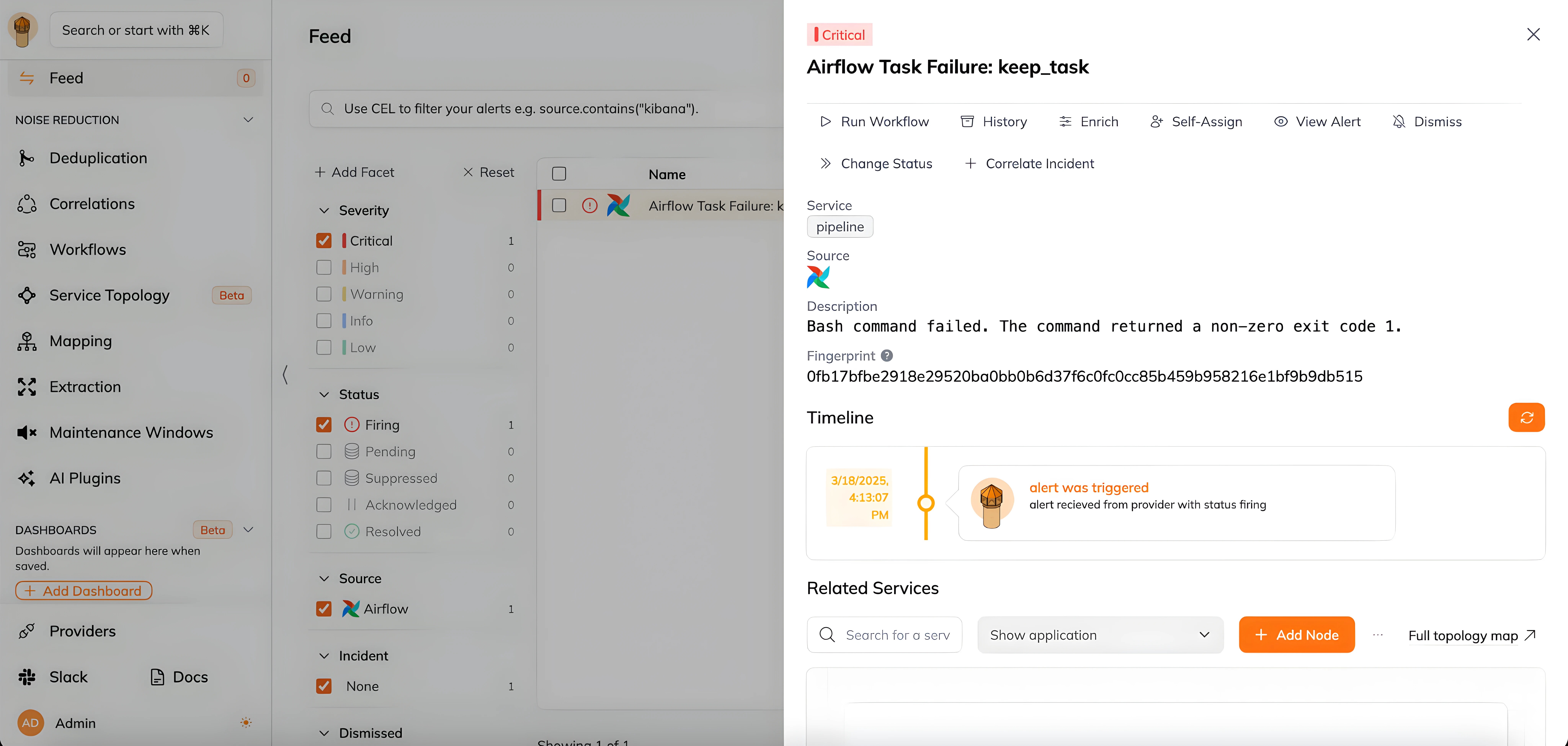
在工作流中
此提供商不能用作工作流中的"步骤"或"操作"。如果您想使用它,请通过在 GitHub 仓库 创建问题告诉我们。